Page 1 of 11
Grom troubleshooting thread

Posted:
Sun Apr 21, 2013 11:51 amby Nipple06
Anyone know how to put it in to advanced mode on iPod function ?
1. is bluetooth in ext 1 because stero controls only work on ext1 when on bluetooth
2. try a firmware update buy going to the grom website and using a mirco sd

Thats all i have this far ...
Re: Grom troubleshooting thread
Posted:
Sun Apr 21, 2013 3:52 pmby db1
You have the USB model? I'm not sure about that model but with mine(no USB) you have to arrange 5 playlists. The cd 1 button on the head unit becomes basic mode with all tracks available. And cds 2-6 becomes your playlists in advanced mode. Although i have been advised by Grom that the unit does not have full compatibility with Subaru HUs, so we can't get any track info.

Edit: I actually haven't found any difference between basic and advanced modes.
Re: Grom troubleshooting thread
Posted:
Thu Apr 25, 2013 11:09 amby Nipple06
i just cant get it to go in advanced mode like a name them all on the ipod 2- what every yet cant change the songs on the head unit
Re: Grom troubleshooting thread
Posted:
Fri May 03, 2013 6:40 amby db1
Continued from here
viewtopic.php?f=22&t=16196&start=375#p312548theironyuppie wrote:hmm, well that's potentially good news and im glad you got yours working. have you got the same head unit model number as me? mines a McIntosh
yes it's the same head unit. Although I have a different GROM unit. There are others from the group buy that are having problems and they have the USB model as well. Maybe there's an isue with those units?
I need to pull the head unit out again anyway when I put the rear camera in so Ill definitely check the cabling.
when you say din connector, do you mean the thick black round one at the back left? this was the only one I saw and was the cause of my first problem. now im wondering if I missed another one.
the Dins are the little round ones that plug into the GROM unit, but you may as well check everything.
also, did your new short white connector (the one that replaces the stock plug in the back of the head unit) clip in correctly?
I noticed that mine didn't 'click' like the stock one did. it seemed to go in all the way and I couldn't notice a difference between the 2 but you don't need to press the button to release it. just wondering if there something wrong with my replacement harness.
I can't remember. It was a while ago.
Re: Grom troubleshooting thread
Posted:
Mon May 06, 2013 12:40 pmby theironyuppie
db1 wrote:Continued from here
viewtopic.php?f=22&t=16196&start=375#p312548theironyuppie wrote:hmm, well that's potentially good news and im glad you got yours working. have you got the same head unit model number as me? mines a McIntosh
yes it's the same head unit. Although I have a different GROM unit. There are others from the group buy that are having problems and they have the USB model as well. Maybe there's an isue with those units?
I need to pull the head unit out again anyway when I put the rear camera in so Ill definitely check the cabling.
when you say din connector, do you mean the thick black round one at the back left? this was the only one I saw and was the cause of my first problem. now im wondering if I missed another one.
the Dins are the little round ones that plug into the GROM unit, but you may as well check everything.
also, did your new short white connector (the one that replaces the stock plug in the back of the head unit) clip in correctly?
I noticed that mine didn't 'click' like the stock one did. it seemed to go in all the way and I couldn't notice a difference between the 2 but you don't need to press the button to release it. just wondering if there something wrong with my replacement harness.
I can't remember. It was a while ago.
seems strange there would be issues with a newer unit, hopefully they can fix it in a firmware update.
I contacted them to ask if it could be resolved and they said they don't have that head unit in the US so they couldn't test it. has anyone else had more luck with them?
Re: Grom troubleshooting thread
Posted:
Tue May 07, 2013 6:32 amby db1
So the reset I mentioned in the other thread didn't work?
Grom troubleshooting thread
Posted:
Thu May 09, 2013 1:27 amby sjm69
Anyone with a Mcintosh PF-28241 HU can you let me know which Grom unit you ordered and if all functions are working ie next track to answer call as mine does not work , trying to see if its my HU or the grom unit that's faulty
FYI I've got the USB grom
Thanks
Re: Grom troubleshooting thread
Posted:
Thu May 09, 2013 8:57 amby db1
I've got a Grom ipd3 (no USB) and a PF-28241 HU. Using it with an iPhone 5 with supplied iPhone cable and lightning adapter. Everything works except for track names.
What device are you connecting to the Grom and which cable are you using?
Re: Grom troubleshooting thread
Posted:
Thu May 09, 2013 8:57 amby db1
Double post
Grom troubleshooting thread
Posted:
Thu May 09, 2013 4:13 pmby sjm69
Im using a iPhone 4S via Bluetooth no cables
I spoke to you a few days ago about the problem
Re: Grom troubleshooting thread
Posted:
Thu May 09, 2013 5:05 pmby jongyrocka
sjm69 wrote:Anyone with a Mcintosh PF-28241 HU can you let me know which Grom unit you ordered and if all functions are working ie next track to answer call as mine does not work , trying to see if its my HU or the grom unit that's faulty
FYI I've got the USB grom
Thanks
I have the exact same setup, and am also having issues....the unit plays songs from a USB, but next/previous track control DOES NOT work, making it useless to switch between inputs, tracks, and calls....
So if anyone out there does have the USB version with the Mcintosh, please let us know!!
Grom troubleshooting thread
Posted:
Thu May 09, 2013 5:14 pmby sjm69
I've spoken to the supplier
This is their response to date
They have been very helpful
Hi Steve,
So far Grom have indicated that they cannot supply any firmware fix without having the radio there to do the testing. We are looking at sourcing a radio like yours to send to Grom, but this will take some time even up to a few months depending on when we can source one and how busy the Grom development team are.
As to whether you will have the same problem on the IPOD only unit, we are trying to check this. We are waiting to hear back from the other customer with the IPOD kit on the same radio as yours to see if he has any problem with the Next Track function. We will let you know the result by Friday.
Grom troubleshooting thread
Posted:
Fri May 10, 2013 1:09 pmby sjm69
Ordered the IPD3 grom to replace the USB grom , will receive it Monday will let you know if it works with the HU and SWC
Grom troubleshooting thread
Posted:
Fri May 10, 2013 1:10 pmby sjm69
Ordered the IPD3 grom to replace the USB grom , will receive it Monday will let you know if it works with the HU and SWC
Re: Grom troubleshooting thread
Posted:
Sun May 12, 2013 1:40 pmby theironyuppie
db1 wrote:So the reset I mentioned in the other thread didn't work?
no, I tried the reset method and had no luck.

theironyuppie wrote:also, did your new short white connector (the one that replaces the stock plug in the back of the head unit) clip in correctly?
I noticed that mine didn't 'click' like the stock one did. it seemed to go in all the way and I couldn't notice a difference between the 2 but you don't need to press the button to release it. just wondering if there something wrong with my replacement harness.
furthermore having had another look while I was behind there, the plug I mentioned which concerned me was actually black, not white. heres a picture.
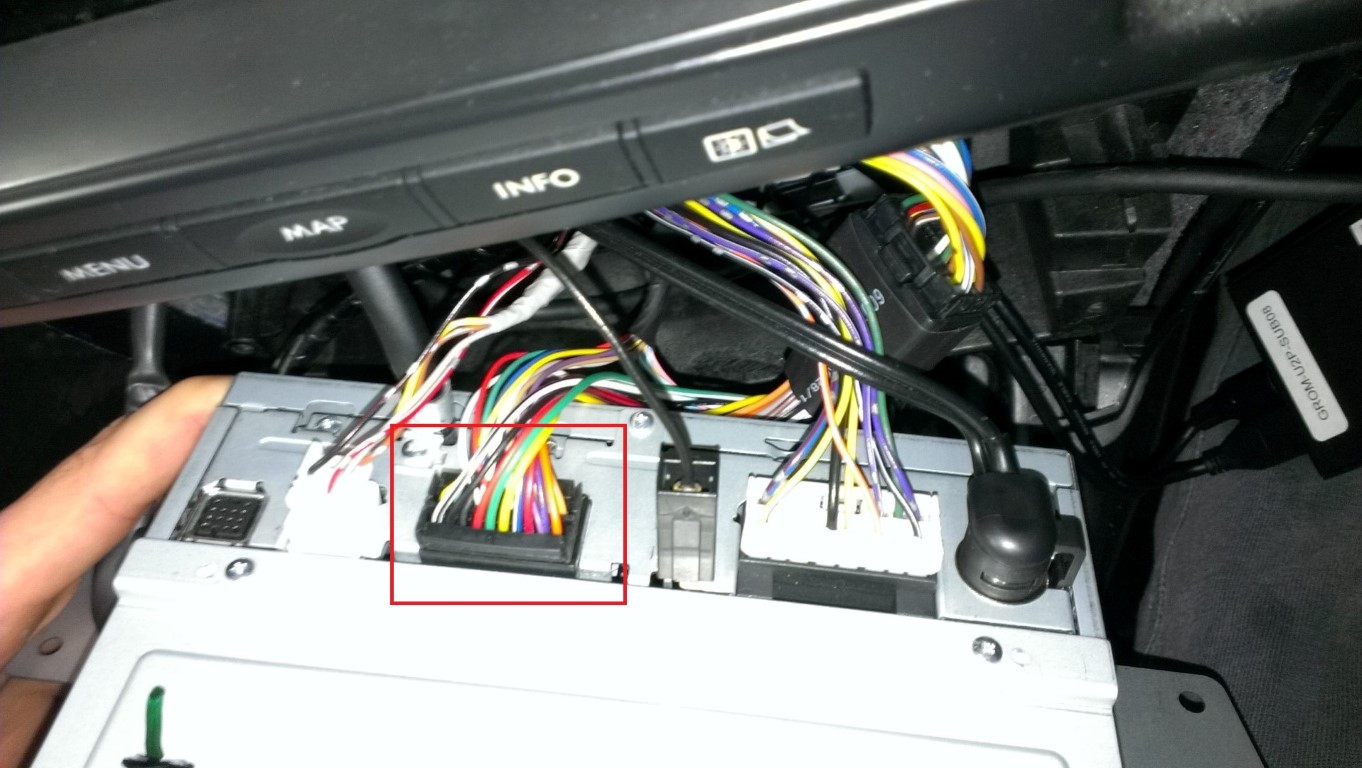
- IMAG0062 (Large) - Copy (Medium).jpg (203.27 KiB) Viewed 14175 times